
GPU, CPU, overclocking and undervolting
How SkillFishOS controls the BC-250's clocks, voltages and temperatures — with the real numbers measured on the hardware.
On a normal APU you tune clocks through the amdgpu sysfs. On the BC-250 that doesn’t work: control goes through the SMU (System Management Unit) and needs dedicated tools. SkillFishOS bundles them all, pre-configured with a safe curve and a thermal-protection system.
Warning: Silicon lottery. Every number on this page is measured on our BC-250. Each card is different: one may take a steeper curve, another less. That’s why SkillFishOS boots with the stock curve (the Performance preset, 2100 MHz ceiling) and lets you change it from the Tuner, which tries each curve on your card with an automatic 25-second test and rolls back on its own if it doesn’t hold.
The voltage/frequency curve and the three presets
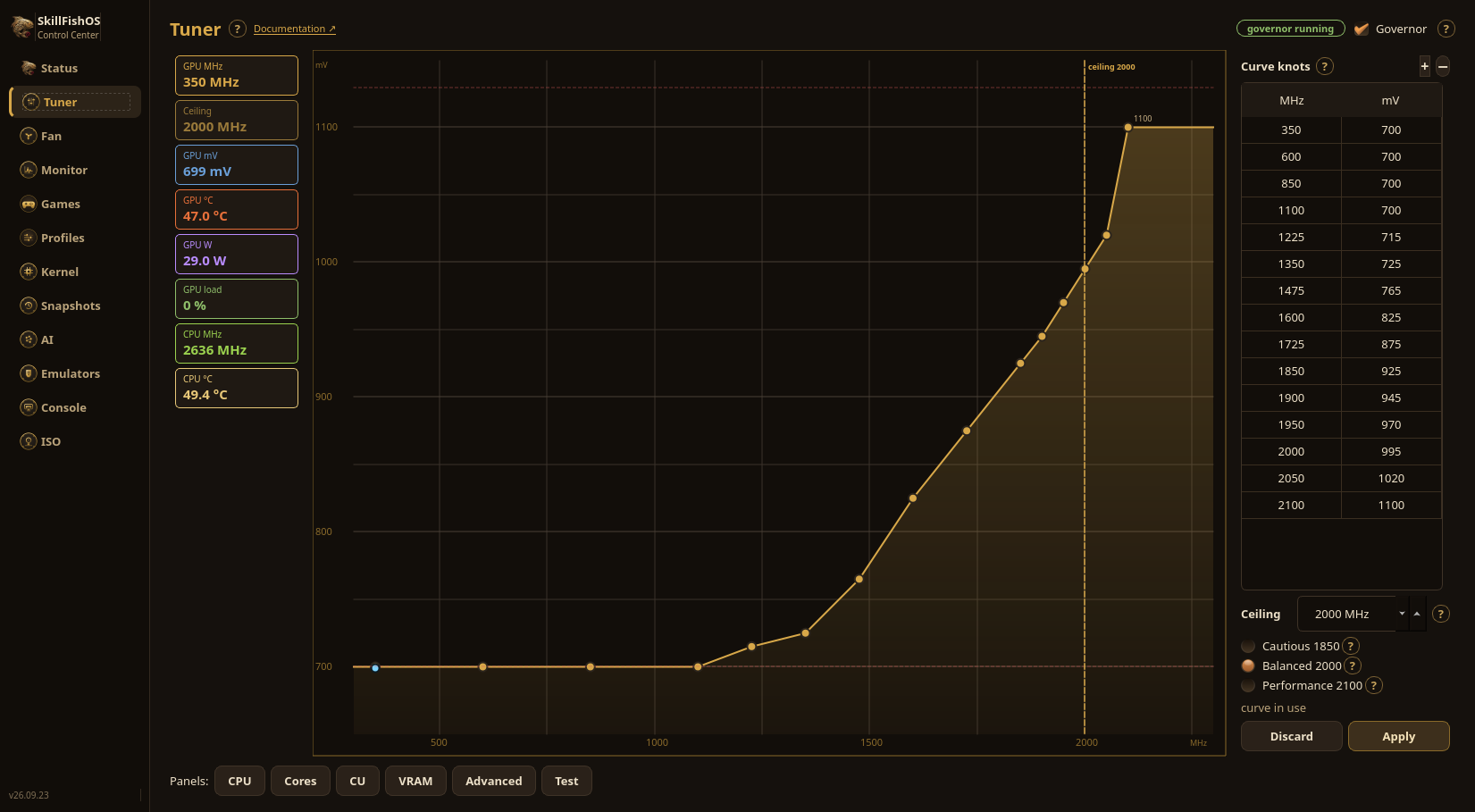
The Tuner drives the GPU with a voltage/frequency curve: MHz on the horizontal axis, millivolts on the vertical one, points you drag on the chart or type into the table next to it. Three presets move the curve’s ceiling:
| Preset | GPU ceiling | Notes |
|---|---|---|
| Cautious | 1850 MHz | The sweet spot with the stock cooler: almost the same frame rate, ten degrees cooler |
| Balanced | 2000 MHz | Trade-off between clock and heat |
| Performance | 2100 MHz | The fifteen-point curve measured on the dev board — the one we ship by default |
Apply is a trial, not an immediate write. A curve that asks for too little voltage hangs the card, and on the BC-250 a hang is fixed only by cutting the power. That’s why Apply keeps the previous curve on disk, tries the candidate for 25 seconds and waits for confirmation: press Keep and it’s written for real; otherwise — or if the card hangs and reboots on its own — the previous curve comes back at boot.
The GPU’s V/F governor
GPU clocks are handled by skillfish-vf-governor, our service that takes the clock and rail away from the stock governor and drives them directly through the SMU, holding a frequency ceiling that heat and power may lower and, once the card has calmed down, give back. A separate process, skillfish-vf-watchdog, takes over if the governor crashes with the clock forced.
Measured on Black Myth: Wukong, same session, same 84 °C in both arms: +4.5% on a cold board, +11% on a warm one compared to the stock governor. The advantage grows with temperature because the stock governor sheds clock as the board warms up, and ours doesn’t.
The standard amdgpu sysfs (
power_dpm_force_performance_level,pp_dpm_sclk) does not control the BC-250 — only skillfish-vf-governor does. The GPU only ramps to the ceiling under real graphics saturation.
CPU overclocking and undervolting
The CPU (8 cores / 16 threads of Zen 2 “Oberon”, two of them unlocked by SkillFishOS via the SMU — also before boot, with an EFI program, in a single reboot) is handled for overclocking by a one-shot service bc250-smu-oc.service that applies the values from /etc/bc250-smu-oc.conf via the bc250_smu_oc project. It shows as inactive after applying — that’s normal (it’s one-shot).
What we measured pushing our card:
- 3700 MHz undervolted to ~1106 mV (
scale −16); - 3900 MHz at ~1199 mV (
scale −24); - 4.0 GHz validated at ~1224 mV (
scale −36) for 120 s of sustained stress, peaking at 83 °C — the usable maximum on this sample; - Hard Vid ceiling: 1.325 V (never exceeded).
Undervolting isn’t about “pushing” — it’s about doing the same work with less heat and less power: at a given frequency, lowering the voltage until it stays stable drops the temperature and leaves thermal headroom for the rest of the APU.
CPU↔GPU thermal coupling
CPU and GPU share the same die and the same power budget. Under mixed load (a demanding game: CPU + GPU together) the APU self-protects and the CPU spontaneously drops to ~3450 MHz to stay within budget and under 85 °C. This is not a defect: it’s the chip protecting itself by shedding the least-useful clocks. For the same reason, a CPU undervolt leaves more thermal “room” for the GPU, and vice-versa.
The 40 Compute Units — live
The BC-250 has 40 CUs (20 pairs), but the driver enables 24 by default. SkillFishOS brings them up to 40 at boot, with no extra step; from the Tuner you adjust the count live by typing the number you want or clicking the 20 paired boxes. The first 24 CUs are driver-locked and always on.
With all 40 CUs enabled the GPU measures 11385 GFLOPS FP32 (vkpeak) cold, versus ~6141 for a 24-CU baseline: +85%. Under sustained stress (hot) it settles around 10214 GFLOPS. Measured memory bandwidth (clpeak) is ~350–367 GB/s.
Silicon lottery. On salvaged/“discard” chips some CUs may be marginal. The Tuner has a “CU test” that stresses each pair with vkpeak and flags GPU faults/hangs, so you can confirm your chip sustains all 40 CUs. (Mechanism via
umr, writing the WGP masks — credit to bc250-cu-live-manager, clean-room reimplementation.)
Thermal protection — the 85 °C cap
The thermal ceiling is 85 °C, enforced on two levels:
- governor side:
gradi_maxandwatt_maxin/etc/skillfish-vf-governor.jsonstep the frequency ceiling down before crossing 85 °C or the power limit (ours, not the firmware’s), and give it back once the card has calmed down; - system side: skillfish-vf-watchdog, a separate process that takes over if the governor crashes with the clock forced.
Things to know about the stock cooler (see also BC-250 hardware for 3D-printable cases and recommended fans):
- the stock heatsink is marginal: “back-to-back” benchmark comparisons are skewed by heat-soak — let the card cool for a few minutes between runs;
- only the GPU edge sensor exists; there is no VRAM temperature sensor;
- memory bandwidth is healthy but
mclkis not adjustable.
A real case: CPU-bound games
Some titles — like Black Myth: Wukong in gameplay — are CPU/draw-call bound: FPS barely depend on resolution or GPU clock. There, CPU overclocking and good cooling help instead. For upscaling, FSR 4 runs through OptiScaler on the game’s DLSS path (see Gaming).
When the workload is GPU-bound (e.g. the Wukong benchmark flythrough), the curve’s ceiling matters: in the Tuner raise the preset from Cautious or Balanced to Performance (2100 MHz), or write your own curve. The measured advantage on Wukong versus the old stock governor is +4.5% on a cold board, +11% on a warm one: the V/F governor doesn’t shed clock as it warms up, where the stock one does. There’s still a hard physical limit: 1129 mV, the voltage ceiling amdgpu declares for this GPU — no curve can exceed it.
All of this, without a terminal
Clocks, the GPU curve, fan and Compute Units are tuned from the Tuner GUI, with the GPU’s three ready presets, an automatic 25-second trial that reverts to the previous curve if your card can’t hold it — see Control Center. It’s the recommended way: start at Cautious, move up to Balanced or Performance, and the Tuner validates everything on your BC-250.
Sources
- skillfish-vf-governor — our V/F governor for the GPU, direct SMU control with a configurable ceiling
- bc250_smu_oc (bc250-collective) — CPU overclock/undervolt via SMU
- bc250.info — community safe-points and thermal notes
- vkpeak · clpeak — FP32 and memory-bandwidth benchmarks