
On-device AI
The local AI engine, Vulkan-accelerated on the BC-250 GPU — Unsloth Studio, with GGUF models from Hugging Face.
SkillFishOS ships a local AI stack: chat and coding models running entirely on the BC-250 GPU, no cloud, nothing sent outside. One click turns it on and off, so GPU and RAM are free again when you want to play.
Why Vulkan and not ROCm
AMD’s “official” compute stack is ROCm, but it does not support the BC-250’s gfx1013. SkillFishOS therefore uses the Vulkan backend with the Mesa/RADV drivers: it makes full use of the integrated GPU and the shared memory (with the extended GTT, see GPU).
How much it matters. Measured on the board with Qwen3-1.7B Q4_K_M:
| CPU only | GPU over Vulkan | ||
|---|---|---|---|
| Generation | 41.5 tok/s | 210.7 tok/s | 5.1× |
| Prompt processing | 9.2 tok/s | 157.2 tok/s | 17× |
The engine: Unsloth Studio
Since 26.08 the engine is Unsloth Studio, replacing the earlier Ollama + OpenWebUI Docker stack. It is a single native service providing both the chat UI and an OpenAI-compatible API, listening on 127.0.0.1:8888.
What changes in practice:
- One service instead of a Docker stack. It used to take three containers (Ollama, OpenWebUI, Dockge) plus a ~6.5 GB custom image; now it is just
skillfish-unsloth.service. - Models come from Hugging Face. Unsloth pulls GGUF files straight from the full Hugging Face catalogue rather than a curated registry, so the range of available models and quantisations is vastly wider — including the builds the Unsloth team publishes themselves.
- On its own it answers the machine and nothing else. From outside you reach it through the Remote Manager, which authenticates over PAM. If you want the other devices at home to use it too, the AI section has a switch that opens it to the local network, with its own user and password.
Models
Models are GGUF files from the Hugging Face catalogue, and they come from two places: the AI section of the Control Center, where you type the repository name (for example unsloth/Qwen3-4B-GGUF) and pick the variant from the list, sizes included; or the Hub inside Unsloth Studio, which has the search and the full model pages.
Rule of thumb on this board: the 16 GB of GDDR6 are shared between system and GPU, so staying under ~11 GB of weights leaves room for everything else.
Switch, update and key
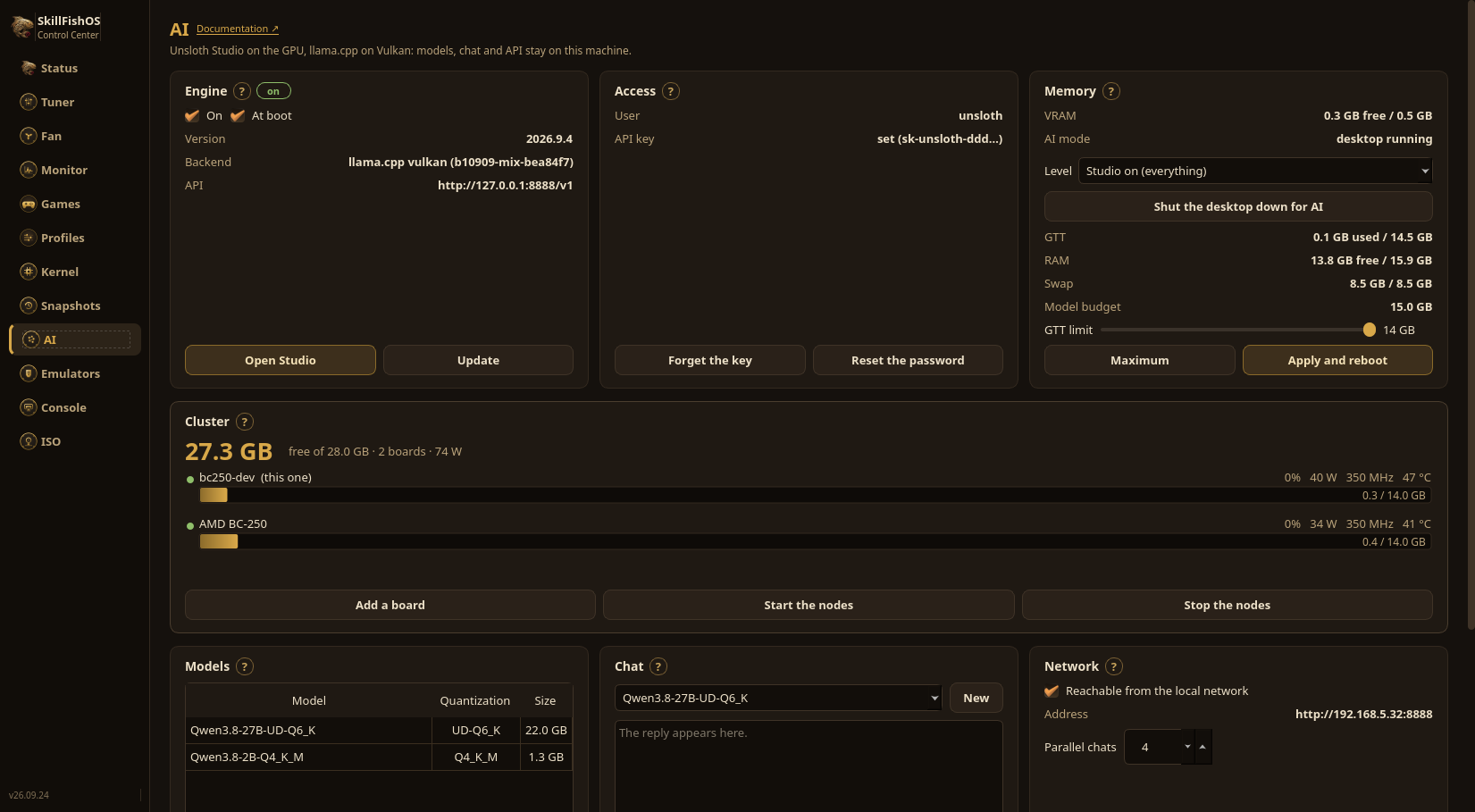
The AI section of the Control Center starts and stops the engine, enables it at boot and shows the version with a one-click update. The same is in the Remote Manager, from a browser.
Unsloth generates a random password when it installs, and shuts itself down after an hour if that password is not changed. The AI section does that step for you: choose the Studio password and the API key is created with it. The key is how the window and the Remote Manager talk to the engine; the models on disk, the memory (VRAM, GTT, RAM, swap) and a chat test with the measured tokens per second sit next to it.
Bear in mind:
- AI and games should not run together: they share the same GPU and the same memory;
- with the engine off, GPU and RAM are fully available for gaming again.
Giving the model more memory
The desktop holds memory the model could use. The AI section shuts it down, and you also choose how much goes down: Studio on, which is the desktop alone; engine only, with web page; engine only, API only, which leaves llama-server by itself on port 8888, with the same API and the same key as before. Measured on a board with a model loaded: 567 MB of system memory becomes 115.
From then on you drive the machine from the Remote Manager on another computer, or over ssh. The model for the bare engine is chosen beforehand, in the same card.
More than one board
Several BC-250 boards share a model too large for one of them. The Cluster card lists the boards, how much memory they hold together and what they are drawing, and starts and stops the nodes. A 22 GB 27B will not even load on a single board; on two it runs at 7.57 tokens per second.
That is what it is for, and it is worth saying plainly: it is not faster. A model that did fit on one board loses about a third of its speed when it is split, because every boundary between layers travels over the network. The cluster is for the models that do not run at all on their own.
Sources
- Unsloth · llama.cpp · Hugging Face
- Mesa / RADV (Vulkan driver)
- ROCm — supported hardware (
gfx1013is not on the list)